
Sell the audit
Lead with a paid context audit, not an open-ended free discovery call. Diagnose the failure, deliver a useful report, and create evidence for the implementation.
For consultants and service providers
The course is built around the Business Knowledge Base Kit, the same kit you use to build and maintain knowledge bases for paying clients. The course teaches the rest: how to run the paid audit, scope the work, price it, build and test it, and hand it off.
90-second course overview
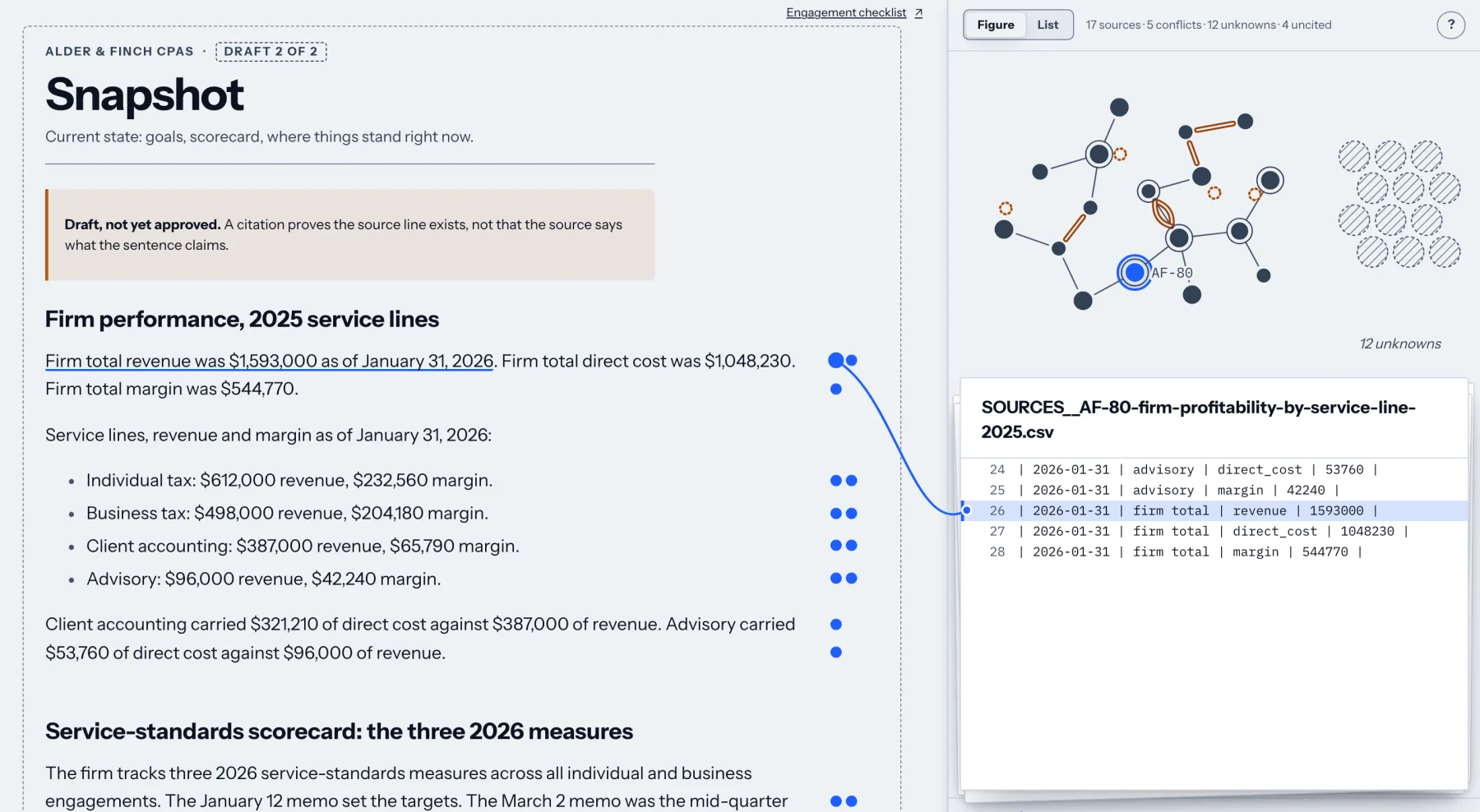 Every claim cites its source. Select a sentence and the line it cites opens beside the note. See the kit
Feedback from Adam’s training and implementation work, not reviews of this course.
“Zero fluff, all execution.”
“You’re a fantastic teacher!”
“You’ve given me the perfect start to it.”
What the course is built around
It turns a client’s folder of documents into a knowledge base where every claim cites the document it came from, the viewer flags any sentence that does not, and nothing counts as knowledge until a person approves it. It runs on your own machine, and the client’s files stay there.
Learn on the worked examples, then run the same kit on a real engagement. Nothing to rebuild between practice and client work. When a client asks where an answer came from, you click the sentence and show them the line.
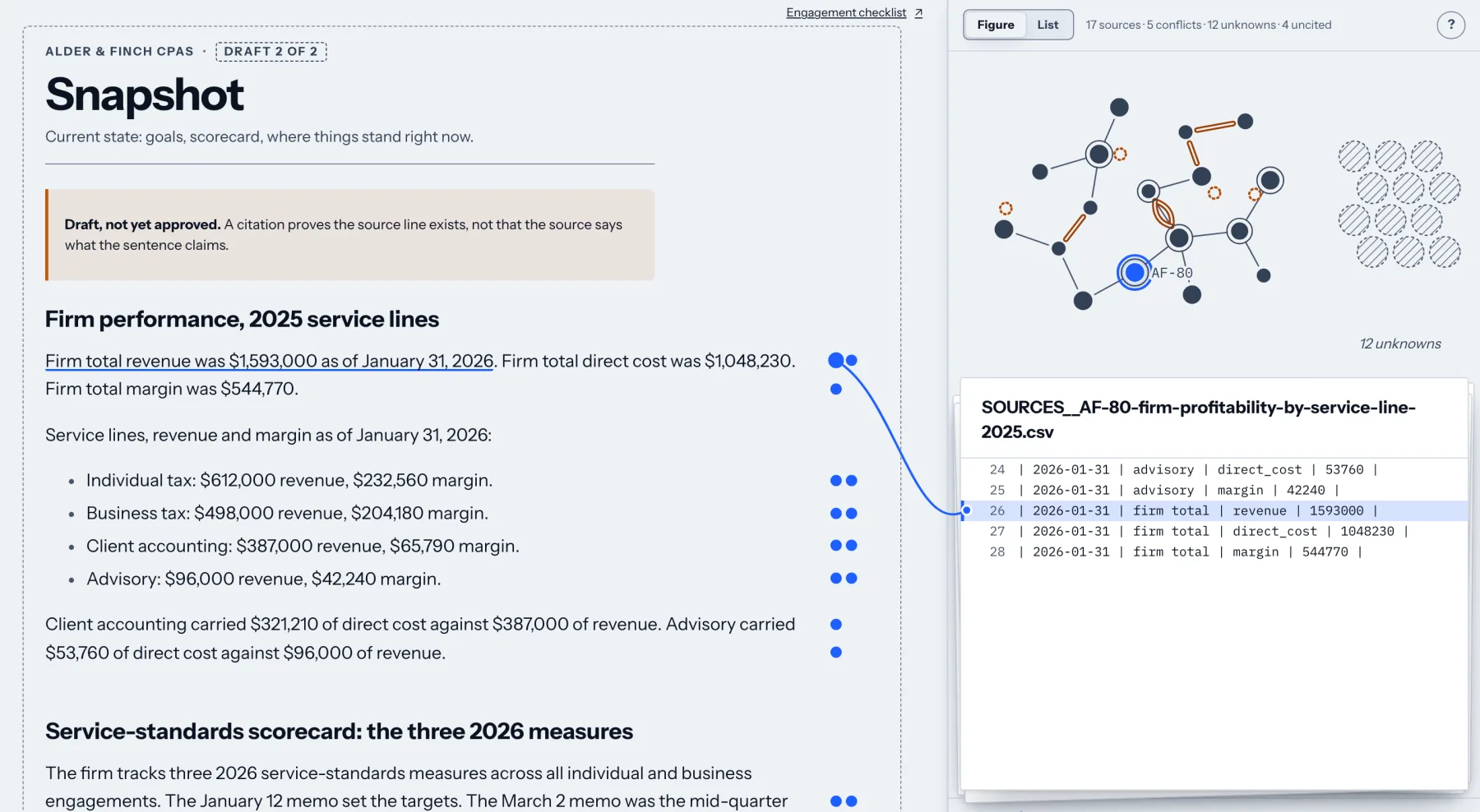
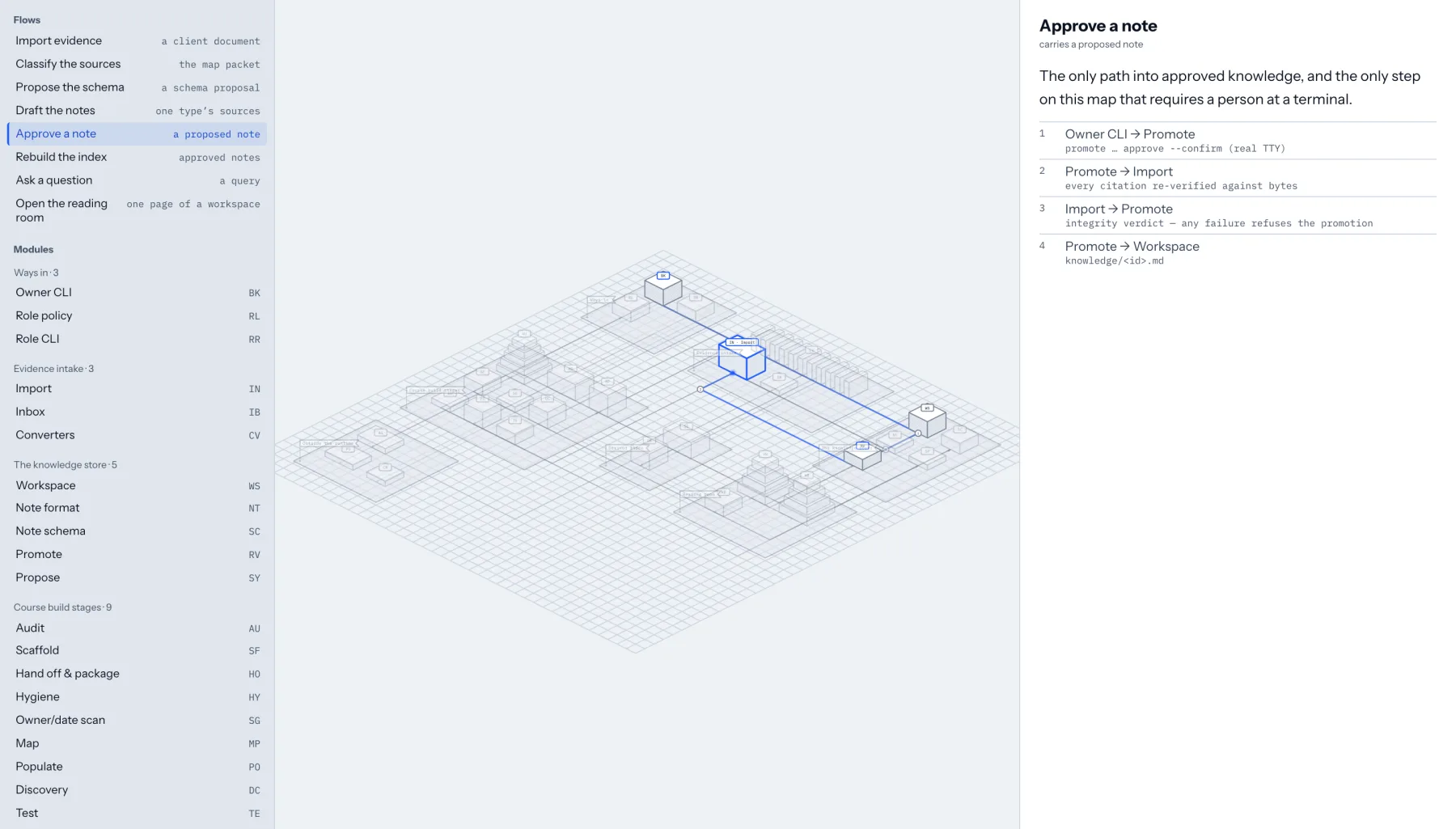
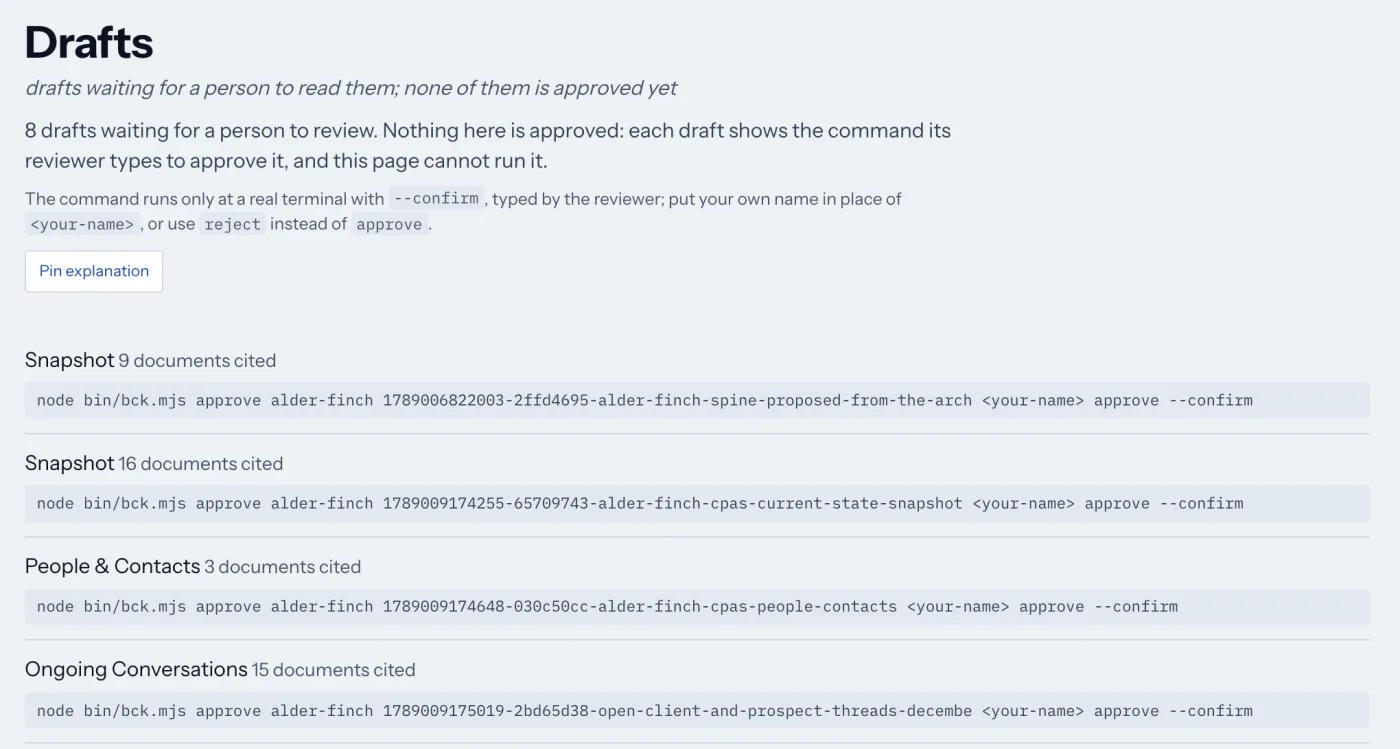
Screens from the kit’s own viewer, showing Alder & Finch CPAs, a fictional example client that ships with the kit.
A Mac with Homebrew and Node.js 22 or newer. One install command in the terminal sets it up and checks it. The skills run in Claude Code. Windows is not supported in this version.
The knowledge it builds is plain Markdown files, so the client can read, copy and keep them without the kit. The course method itself needs none of the above.
It is a download on your course page, and new releases replace it there. The latest is from October 2026.
Enrollment reopened with the Harbor Ridge engagement.
Most businesses do not have a prompting problem. They have a context problem. Prompts are temporary. The knowledge base you build on your own material is what keeps working.
So the course builds one. You run a client engagement on Harbor Ridge Mechanical, a commercial HVAC company whose answers have stopped agreeing with each other, from the Module 1 diagnosis to the Module 9 handoff. Its evidence is built, not promised: the engagement runs on 111 artifacts spanning the client's timeline, and you receive the ones each release opens as you register your work. Every module then asks for the same move on your own material, one file at a time, until the practice build is a knowledge base you own.
I cannot show you my clients' files, so I built a company I can show you everything of.
Selling is inside the course, not sold separately. Module 4 puts a fixed-scope audit in front of the build so a prospect can say yes to something small, credited toward the work if they proceed. Module 10 packages it as Audit, Core, and Premium tiers with named outputs and explicit exclusions.
$997 one time. Lifetime access to the version you buy, plus updates while it is offered. The community is a private Slack, asynchronous.
From capability to offer
The course connects the implementation method to a commercial path. You learn how to frame a context problem before a buyer knows what to call it, give them a bounded first step, and turn the findings into a larger engagement.
Lead with a paid context audit, not an open-ended free discovery call. Diagnose the failure, deliver a useful report, and create evidence for the implementation.
Turn the audit into a bounded engagement: what changes, what the client receives, how the work is tested, and how to explain its value.
Close with a handoff the client can trust, then offer maintenance for the business context that keeps changing after launch.
You get the sales and positioning framework, offer template, and delivery artifacts. The course does not provide leads or promise clients or revenue.
The problem you get called about
A professional second brain is not just a folder or chatbot. Underneath it is a source-backed knowledge base that is testable, maintainable, and ready to hand over.
A business dumps its meeting notes, old strategy decks, and chat threads into one folder, points an AI at it, and gets fluent answers drawn from a pile nobody curated. Everything ingested, nothing differentiated. Two documents disagree, and the person who knew which one was right left months ago.
A maintained, source-backed set of structured notes that makes reliable context retrievable by people and by AI.
Step 1 · Modules 1, 4
Not everything it has stored. You diagnose the context failure in writing, for money: the audit is a tripwire offer that stands on its own, not a free discovery call.
Step 2 · Modules 2, 3, 6
Seven durable note types, plus the spine: the short note that orients everything else and points to the rest. Plain files first, so nothing is locked to a vendor.
Step 3 · Module 5
You draft in a working copy the client is not relying on, and publish on purpose. The changelog tells the story of the build. The access register records who can see and change what.
Step 4 · Module 7
A knowledge base nobody consults is a folder. Activation makes it the first thing the AI reaches for, with written boundaries on what it may answer from.
Step 5 · Module 8
Written questions, known answers, known sources. An ungrounded answer sounds exactly like a grounded one, which is why this is a gate and not a nice to have.
Step 6 · Modules 9, 10
They get the files, the access register, the changelog, and a maintenance routine they can run. Then you price the maintenance, because context decays whether or not anyone is watching it.
Breadth
Every module opens with a video walkthrough, then a Build This Next block that advances the same practice build, then the written lesson. You pick one small business, project, or fictional client on day one and carry it the whole way.
# what YOU build, over 10 stages
01-audit/
  context-health-report.md
  architecture-map.md
  audit-report.md          # the paid tripwire
02-working-copy/
  SPINE.md
  1-snapshot.md ... 7-open-loops.md
  CHANGELOG.md
  ACCESS-REGISTER.md
03-tests/
  activation-boundaries.md
  retrieval-test-results.md   # the gate
04-handoff/
  handoff-package/
OFFER.md                  # what you sell
The method needs no coding experience, vector database, API keys, custom app, or particular vendor.
The included kit runs on a Mac with Homebrew and Node.js 22 or newer, set up with one install command, and its skills run in Claude Code. Windows is not supported in this version.
Learning and implementation
Feedback from Adam’s training sessions, masterclasses, and webinars, not reviews of this course.
Want to say thank you for your masterclass. I have attended it live yesterday and its really amazing to know what one can achieve using the Claude. I have also started using it and at present in the learning phase. Reading your blog on How you built the PDP Forge, and subscribed for the waiting list too on the website. The prompt you have used are totally different as what others are using. The outcome driven prompts help me understand that instead of giving how to code, if I say what user will do on certain step really change the output.
Hey Adam, thank you so much for your brilliant Vibe Marketer webinar yesterday! Very much enjoyed it and loved your hands-on presentation style. After working with ChatGPT for some time, I’ve been meaning to explore Claude Code and you’ve given me the perfect start to it. Would love to connect!
Adam’s literally on the bleeding edge of Claude Agent workflows. If you want the latest AI content automation stuff that actually works (not theory), reach out to him. Zero fluff, all execution.
Hey - just wanted to give you big ups for the claude intro session today. Super helpful, super informative, and super well presented. Bravo sir!
Hey Adam, that was an awesome session. Love how you kept your composure when everyone including myself was not working!
Great session today Adam!!! Thanks again for your time. Really cool to finally see Claude Code in action.
“Adam! Thank you for a great training today. You’re a fantastic teacher!”
Michelle AidenTraining feedback
“Incredible showcase, Adam.”
OhadSession feedback
“Was super helpful, great info”
Dustin CotaSession feedback
You have seen the kit, the six-step method, the 10-stage practice build, and the artifacts you finish holding. The rest of this page is detail.
Fit
Straight answers
Already bought it? Log in to open the course, or use password recovery if you need to set a new password. Questions before you buy? Email adam@viableedge.com.
Enrollment reopened with the Harbor Ridge engagement.
This course teaches the six-step delivery method above through 11 modules, a learner-owned practice build, and the templates you use to run it. Buying opens all of it immediately.
$997one time
Enrollment runs in intake cohorts of about ten. A cohort is who you learn alongside: people who bought at a similar time, one private Slack channel, and live sessions every two weeks, a mix of group workshops, Q&A, office hours and case studies. Every session is recorded and added to the course. The modules are self-paced: you get every one the moment you buy, nothing starts on a date and nothing expires, and you keep lifetime access to the version you bought plus updates while it is offered.
Lifetime access to the version you buy, plus updates while it is offered. The community is a private Slack, asynchronous between sessions.
Prefer to spread it out? Affirm payment plans are available at checkout.
Full refund within 3 days of purchase, no conditions. Email adam@viableedge.com to request one.
Every template you use on Harbor Ridge is one you take to a client.